
Use GWP-ASan to detect exploits in production environments
Memory safety bugs like use-after-free and buffer overflows remain among the most exploited vulnerability classes in production software. While AddressSanitizer (ASan) excels at catching these bugs during development, its performance overhead (2 to 4 times) and security concerns make it unsuitable for production. What if you could detect many of the same critical bugs in live systems with virtually no performance impact?
GWP-ASan (GWP-ASan Will Provide Allocation SANity) addresses this gap by using a sampling-based approach. By instrumenting only a fraction of memory allocations, it can detect double-free, use-after-free, and heap-buffer-overflow errors in production at scale while maintaining near-native performance.
In this post, we’ll explain how allocation sanitizers like GWP-ASan work and show how to use one in your projects, using an example based on GWP-ASan from LLVM’s scudo allocator in C++. We recommend using it to harden security-critical software since it may help you find rare bugs and vulnerabilities used in the wild.
How allocation sanitizers work
There is more than one allocation sanitizer implementation (e.g., the Android, TCMalloc, and Chromium GWP-ASan implementations, Probabilistic Heap Checker, and Kernel Electric-Fence [KFENCE]), and they all share core principles derived from Electric Fence. The key technique is to instrument a randomly chosen fraction of heap allocations and, instead of returning memory from the regular heap, place these allocations in special isolated regions with guard pages to detect memory errors. In other words, GWP-ASan trades detection certainty for performance: instead of catching every bug like ASan does, it catches heap-related bugs (use-after-frees, out-of-bounds-heap accesses, and double-frees) with near-zero overhead.
The allocator surrounds each sampled allocation with two inaccessible guard pages (one directly before and one directly after the allocated memory). If the program attempts to access memory within these guard pages, it triggers detection and reporting of the out-of-bounds access.
However, since operating systems allocate memory in page-sized chunks (typically 4 KB or 16 KB), but applications often request much smaller amounts, there is usually leftover space between the guard pages that won’t trigger detection even though the access should be considered invalid.
To maximize detection of small buffer overruns despite this limitation, GWP-ASan randomly aligns allocations to either the left or right edge of the accessible region, increasing the likelihood that out-of-bounds accesses will hit a guard page rather than landing in the undetected leftover space.
Figure 1 illustrates this concept. The allocated memory is shown in green, the leftover space in yellow, and the inaccessible guard pages in red. While the allocations are aligned to the left or right edge, some memory alignment requirements can create a third scenario:
- Left alignment: Catches underflow bugs immediately but detects only larger overflow bugs (such that they access the right guard page)
- Right alignment: Detects even single-byte overflows but misses smaller underflow bugs
- Right alignment with alignment gap: When allocations have specific alignment requirements (such as structures that must be aligned to certain byte boundaries), GWP-ASan cannot place them right before the second guard page. This creates an unavoidable alignment gap where small buffer overruns may go undetected.
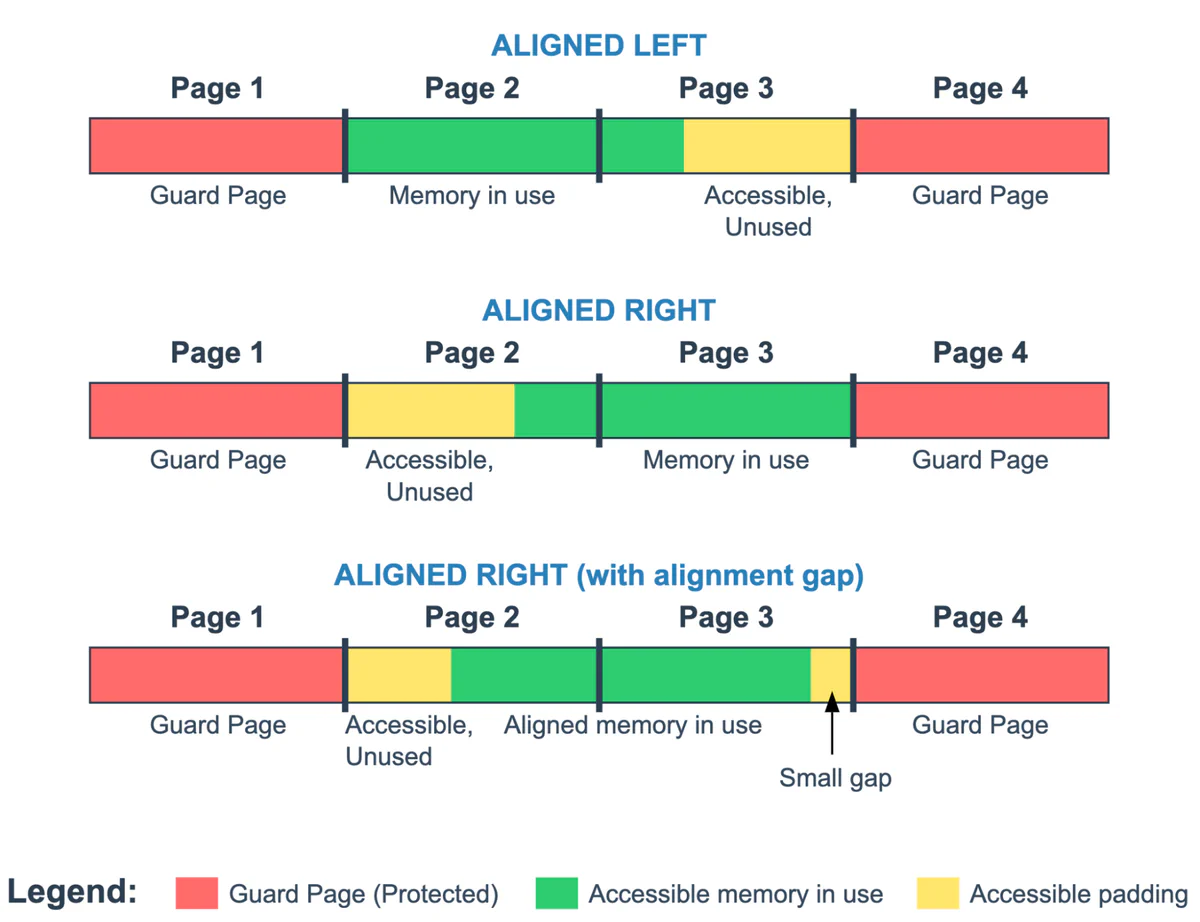
GWP-ASan also detects use-after-free bugs by making the freed memory pages inaccessible for the instrumented allocations (by changing their permissions). Any subsequent access to this memory causes a segmentation fault, allowing GWP-ASan to detect the use-after-free bug.
Where allocation sanitizers are used
GWP-ASan’s sampling approach makes it viable for production deployment. Rather than instrumenting every allocation like ASan, GWP-ASan typically guards less than 0.1% of allocations, creating negligible performance overhead. This trade-off works at scale—with millions of users, even rare bugs will eventually trigger detection across the user base.
GWP-ASan has been integrated into several major software projects:
- Google developed GWP-ASan for Chromium, which is enabled in Chrome on Windows and macOS by default.
- It is available in TCMalloc, Google’s thread-caching memory allocator for C and C++.
- Mozilla reimplemented GWP-ASan as its Probabilistic Heap Checker (PHC) tool, which is part of Firefox Nightly. Mozilla is also working on enabling it on Firefox’s release channel.
- GWP-ASan is part of Android as well! It’s enabled for some system services and can be easily enabled for other apps by developers, even without recompilation. If you are developing a high profile application, you should consider setting the
android:gwpAsanModetag in your app’s manifest to"always". But even without that, since Android 14, all apps use Recoverable GWP-ASan by default, which enables GWP-ASan in ~1% of app launches and reports the detected bugs; however, it does not terminate the app when bugs occur, potentially allowing for a successful exploitation. - It’s available in Firebase’s real-time crash reporting tool Crashlytics.
- It’s available on Apple’s WebKit under the name of Probabilistic Guard Malloc (please don’t confuse this with Apple’s Guard Malloc, which works more like a black box ASan).
And GWP-ASan is used in many other projects. You can also easily compile your programs with GWP-ASan using LLVM! In the next section, we’ll walk you through how to do so.
How to use it in your project
In this section, we’ll show you how to use GWP-ASan in a C++ program built with Clang, but the example should easily translate to every language with GWP-ASan support.
To use GWP-ASan in your program, you need an allocator that supports it. (If no such allocator is available on your platform, it’s easy to implement a simple one.) Scudo is one such allocator and is included in the LLVM project; it is also used in Android and Fuchsia. To use Scudo, add the -fsanitize=scudo flag when building your project with Clang. You can also use the UndefinedBehaviorSanitizer at the same time by using the -fsanitize=scudo,undefined flag; both are suitable for deployment in production environments.
After building the program with Scudo, you can configure the GWP-ASan sanitization parameters by setting environment variables when the process starts, as shown in figure 2. These are the most important parameters:
Enabled: A Boolean value that turns GWP-ASan on or offMaxSimultaneousAllocations: The maximum number of guarded allocations at the same timeSampleRate: The probability that an allocation will be selected for sanitization (a ratio of one guarded allocation perSampleRateallocations)
$ SCUDO_OPTIONS="GWP_ASAN_SampleRate=1000000:GWP_ASAN_MaxSimultaneousAllocations=128" ./programThe MaxSimultaneousAllocations and SampleRate parameters have default values (16 and 5000, respectively) for situations when the environment variables are not set. The default values can also be overwritten by defining an external function, as shown in figure 3.
#include <iostream>

// Setting up default values of GWP-ASan parameters:
extern "C" const char *__gwp_asan_default_options() {
  return "MaxSimultaneousAllocations=128:SampleRate=1000000";
}
// Rest of the program

int main() {
	// …
}To demonstrate the concept of allocation sanitization using GWP-ASan, we’ll run the tool over a straightforward example of code with a use-after-free error, shown in figure 4.
#include <iostream>

int main() {
	char * const heap = new char[32]{"1234567890"};
	std::cout << heap << std::endl;
	delete[] heap;
	std::cout << heap << std::endl; // Use After Free!
}We’ll compile the code in figure 4 with Scudo and run it with a SampleRate of 10 five times in a loop.
The error isn’t detected every time the tool is run, because a SampleRate of 10 means that an allocation has only a 10% chance of being sampled. However, if we run the process in a loop, we will eventually see a crash.
$ clang++ -fsanitize=scudo -g src.cpp -o program
$ for f in {1..5}; do SCUDO_OPTIONS="GWP_ASAN_SampleRate=10:GWP_ASAN_MaxSimultaneousAllocations=128" ./program; done
1234567890
1234567890
1234567890
1234567890
1234567890
1234567890
1234567890
*** GWP-ASan detected a memory error ***
Use After Free at 0x7f2277aff000 (0 bytes into a 32-byte allocation at 0x7f2277aff000) by thread 95857 here:
 #0 ./program(+0x39ae) [0x5598274d79ae]
 #1 ./program(+0x3d17) [0x5598274d7d17]
 #2 ./program(+0x3fe4) [0x5598274d7fe4]
 #3 /usr/lib/libc.so.6(+0x3e710) [0x7f4f77c3e710]
 #4 /usr/lib/libc.so.6(+0x17045c) [0x7f4f77d7045c]
 #5 /usr/lib/libstdc++.so.6(_ZStlsISt11char_traitsIcEERSt13basic_ostreamIcT_ES5_PKc+0x1e) [0x7f4f78148dae]
 #6 ./program(main+0xac) [0x5598274e4aac]
 #7 /usr/lib/libc.so.6(+0x27cd0) [0x7f4f77c27cd0]
 #8 /usr/lib/libc.so.6(__libc_start_main+0x8a) [0x7f4f77c27d8a]
 #9 ./program(_start+0x25) [0x5598274d6095]

0x7f2277aff000 was deallocated by thread 95857 here:
 #0 ./program(+0x39ce) [0x5598274d79ce]
 #1 ./program(+0x2299) [0x5598274d6299]
 #2 ./program(+0x32fc) [0x5598274d72fc]
 #3 ./program(+0xffa4) [0x5598274e3fa4]
 #4 ./program(main+0x9c) [0x5598274e4a9c]
 #5 /usr/lib/libc.so.6(+0x27cd0) [0x7f4f77c27cd0]
 #6 /usr/lib/libc.so.6(__libc_start_main+0x8a) [0x7f4f77c27d8a]
 #7 ./program(_start+0x25) [0x5598274d6095]

0x7f2277aff000 was allocated by thread 95857 here:
 #0 ./program(+0x39ce) [0x5598274d79ce]
 #1 ./program(+0x2299) [0x5598274d6299]
 #2 ./program(+0x2f94) [0x5598274d6f94]
 #3 ./program(+0xf109) [0x5598274e3109]
 #4 ./program(main+0x24) [0x5598274e4a24]
 #5 /usr/lib/libc.so.6(+0x27cd0) [0x7f4f77c27cd0]
 #6 /usr/lib/libc.so.6(__libc_start_main+0x8a) [0x7f4f77c27d8a]
 #7 ./program(_start+0x25) [0x5598274d6095]

*** End GWP-ASan report ***
Segmentation fault (core dumped)
1234567890
1234567890When the problematic allocation is sampled, the tool detects the bug and prints an error. Note, however, that for this example program and with the GWP-ASan parameters set to those shown in figure 5, statistically the tool will detect the error only once every 10 executions.
You can experiment with a live example of this same program here (note that the loop is inside the program rather than outside for convenience).
You may be able to improve the readability of the errors by symbolizing the error message using LLVM’s compiler-rt/lib/gwp_asan/scripts/symbolize.sh script. The script takes a full error message from standard input and converts memory addresses into symbols and source code lines.
Performance and memory overhead
Performance and memory overhead depend on the given implementation of GWP-ASan. For example, it’s possible to improve the memory overhead by creating a buffer at startup where every second page is a guard page so that GWP-ASan can periodically reuse accessible pages. So instead of allocating three pages for one guarded allocation every time, it allocates around two. But it limits sanitization to areas smaller than a single memory page.
However, while memory overhead may vary between implementations, the difference is largely negligible. With the MaxSimultaneousAllocations parameter, the overhead can be capped and measured, and the SampleRate parameter can be set to a value that limits CPU overhead to one accepted by developers.
So how big is the performance overhead? We’ll check the impact of the number of allocations on GWP-ASan’s performance by running a simple example program that allocates and deallocates memory in a loop (figure 6).
int main() {
	for(size_t i = 0; i < 100'000; ++i) {
    	    	char **matrix = new_matrix();
    	    	access_matrix(matrix);
    	    	delete_matrix(matrix);
	}
}The process uses the functions shown in figure 7 to allocate and deallocate memory. The source code contains no bugs.
#include <cstddef>

constexpr size_t N = 1024;

char **new_matrix() {
	char ** matrix = new char*[N];
	for(size_t i = 0; i < N; ++i) {
    	    	matrix[i] = new char[N];
	}

	return matrix;
}

void delete_matrix(char **matrix) {
	for(size_t i = 0; i < N; ++i) {
    	    	delete[] matrix[i];
	}
	delete[] matrix;
}

void access_matrix(char **matrix) {
	for(size_t i = 0; i < N; ++i) {
    	    	matrix[i][i] += 1;
    	    	(void) matrix[i][i]; // To avoid optimizing-out
	}
}But before we continue, let’s make sure that we understand what exactly impacts performance. We’ll use a control program (figure 8) where allocation and deallocation are called only once and GWP-ASan is turned off.
int main() {
	char **matrix = new_matrix();

	for(size_t i = 0; i < 100'000; ++i) {
    	    	access_matrix(matrix);
	}

	delete_matrix(matrix);
}If we simply run the control program with either a default allocator or the Scudo allocator and with different levels of optimization (0 to 3) and no GWP-ASan, the execution time is negligible compared to the execution time of the original program in figure 6. Therefore, it’s clear that allocations are responsible for most of the execution time, and we can continue using the original program only.
We can now run the program with the Scudo allocator (without GWP-ASan) and with a standard allocator. The results are surprising. Figure 9 shows that the Scudo allocator has much better (smaller) times than the standard allocator. With that in mind, we can continue our test focusing only on the Scudo allocator. While we don’t present a proper benchmark, the results are consistent between different runs, and we aim to only roughly estimate the overhead complexity and confirm that it’s close to linear.
$ clang++ -g -O3 performance.cpp -o performance_test_standard
$ clang++ -fsanitize=scudo -g -O3 performance.cpp -o performance_test_scudo

$ time ./performance_test_standard
3.41s user 18.88s system 99% cpu 22.355 total

$ time SCUDO_OPTIONS="GWP_ASAN_Enabled=false" ./performance_test_scudo
4.87s user 0.00s system 99% cpu 4.881 totalBecause GWP-ASan has very big CPU overhead, for our tests we’ll change the value of the variable N from figure 7 to 256 (N=256) and reduce the number of loops in the main function (figure 8) to 10,000.
We’ll run the program with GWP-ASan with different SampleRate values (figure 10) and an updated N value and number of loops.
$ time SCUDO_OPTIONS="GWP_ASAN_Enabled=false" ./performance_test_scudo
0.07s user 0.00s system 99% cpu 0.068 total

$ time SCUDO_OPTIONS="GWP_ASAN_SampleRate=1000:GWP_ASAN_MaxSimultaneousAllocations=257" ./performance_test_scudo
0.08s user 0.01s system 98% cpu 0.093 total

$ time SCUDO_OPTIONS="GWP_ASAN_SampleRate=100:GWP_ASAN_MaxSimultaneousAllocations=257" ./performance_test_scudo
0.13s user 0.14s system 95% cpu 0.284 total

$  time SCUDO_OPTIONS="GWP_ASAN_SampleRate=10:GWP_ASAN_MaxSimultaneousAllocations=257" ./performance_test_scudo
0.46s user 1.53s system 94% cpu 2.117 total

$ time SCUDO_OPTIONS="GWP_ASAN_SampleRate=1:GWP_ASAN_MaxSimultaneousAllocations=257" ./performance_test_scudo
5.09s user 16.95s system 93% cpu 23.470 total
Figure 10 shows that the run time grows linearly with the number of allocations sampled (meaning the lower the SampleRate, the slower the performance). Therefore, guarding every allocation is not possible due to the performance hit. However, it is easy to limit the SampleRate parameter to an acceptable value—large enough to conserve performance but small enough to sample enough allocations. When GWP-ASan is used as designed (with a large SampleRate), the performance hit is negligible.
Add allocation sanitization to your projects today!
GWP-ASan effectively increases bug detection with minimal performance cost and memory overhead. It can be used as a last resort to detect security vulnerabilities, but it should be noted that bugs detected by GWP-ASan could have occurred before being detected—the number of occurrences depends on the sampling rate. Nevertheless, it’s better to have a chance of detecting bugs than no chance at all.
If you plan to incorporate allocation sanitization into your programs, contact us! We can provide guidance in establishing a reporting system and with evaluating collected crash data. We can also assist you in incorporating robust memory bug detection into your project, using not only ASan and allocation sanitization, but also techniques such as fuzzing and buffer hardening.
After we drafted this post, but long before we published it, the paper “GWP-ASan: Sampling-Based Detection of Memory-Safety Bugs in Production” was published. We suggest reading it for additional details and analyses regarding the use of GWP-ASan in real-world applications.
If you want to learn more about ASan and detect more bugs before they reach production, read our previous blog posts: